
Flexn Studio
Flexn's IDE: start a project from a template, then run its builds on your own machine or in the cloud.
Overview
Flexn Studio is the IDE of Flexn, a unified development platform for building apps for mobile, web, TVs, wearables, consoles and more (“Bootstrap, Develop, Release”). In Studio, teams start projects from ready-made templates and run their builds on their own machine or in Flexn’s cloud.
My role
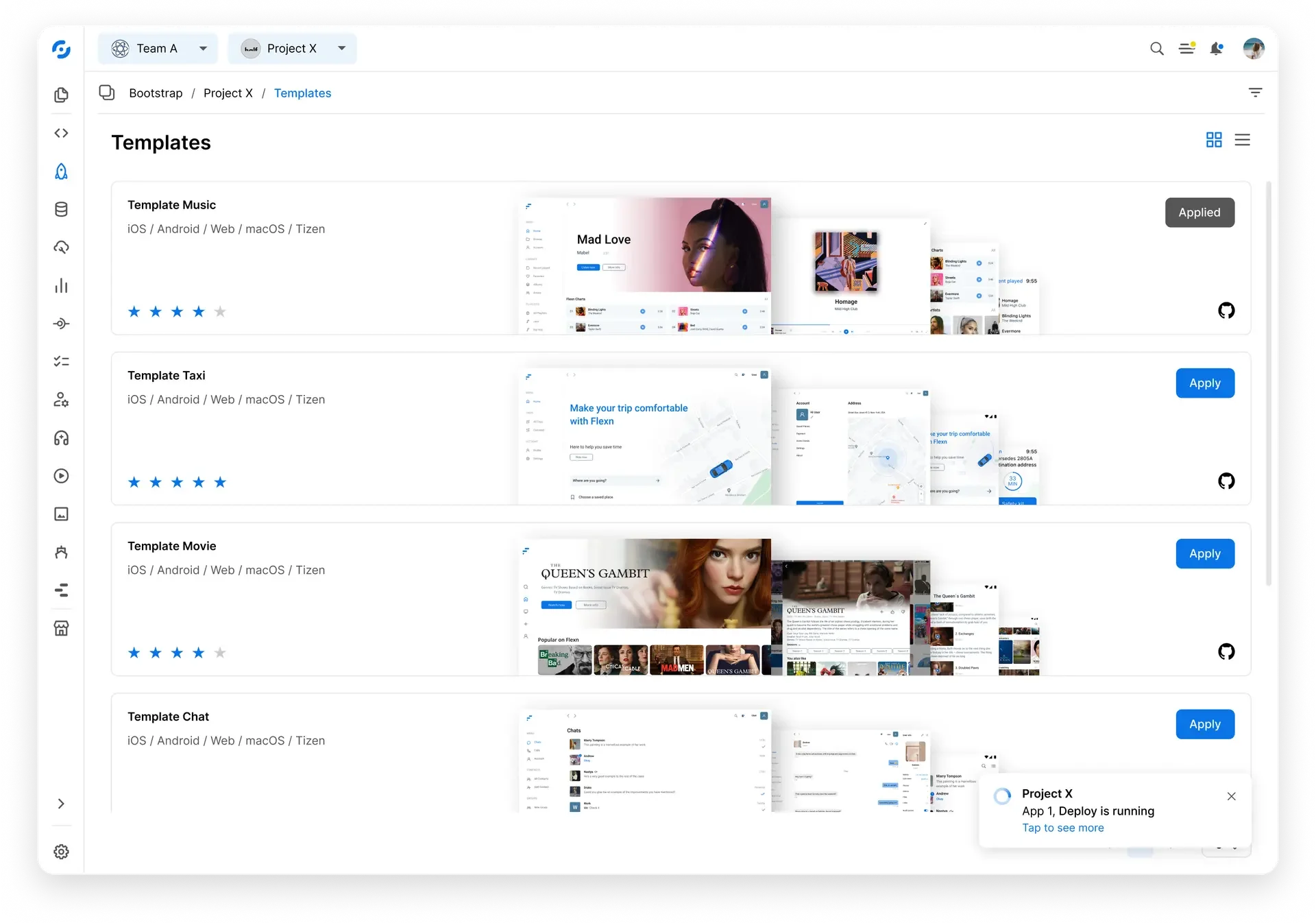
Product Designer. At Flexn I designed products end to end, from UX research, information architecture and user flows to wireframes, prototypes, style guides and UI. For Studio I designed the interface; the templates screen is shown here.
Design approach
- Always know where you are. Switchers for the team and the project sit at the top, with a breadcrumb underneath (Bootstrap / Project X / Templates).
- Templates that compare at a glance. Each card shows the platforms the template builds for (iOS, Android, Web, macOS, Tizen), a rating, previews of its screens and a link to its GitHub source. One Apply action starts it, and an applied template says “Applied”.
- Two ways to browse. Templates can be shown as a grid or as a list.
- Deploys report in the background. A notice in the corner says a deploy is running (“App 1, Deploy is running”) and offers the details (“Tap to see more”) without stopping the work.
- One rail for every tool. A narrow icon rail on the left holds the app’s sections.
Key responsibilities
- Studio interface, from user flows to UI
- Wireframes and prototypes, low and high fidelity
- Component library and style guide
- Icon set preparation
- Templates screen: cards, platforms, ratings and apply states
- Team and project switching, breadcrumbs and the navigation rail
- Deploy status notifications
- Handoff to developers in an Agile team